
When you build software through prompting, the workflow inverts.
In traditional design practice, you start with structure. You map journeys, arrange screen flows on a canvas, and establish the topology before anyone writes a line of code. You always know where a screen sits in relation to the whole system because you had to draw the lines to get there.
With AI-assisted building, you jump straight into the implementation. You describe what you want, inspect the running output, prompt-tweak the layout, and move on to the next screen. It is remarkably fast, but it creates a blind spot: you lose the bird’s-eye view of the architecture.
After a few days of rapid iteration, fundamental questions become surprisingly hard to answer:
- What is the complete inventory of screens currently running?
- Which branches are dead ends or missing back-links?
- What does the journey actually look like when stepped through from end to end?
You have a functioning application, but no sitemap, no user flow, and no spatial artifact to review with anyone else.
Reversing the workflow
I built FlowMap to test whether running code could generate its own design documentation automatically.
Instead of parsing source code and guessing at routing logic, FlowMap runs locally, boots the dev server, and traverses the application directly. It crawls the reachable paths, photographs every screen state across both happy and unhappy paths, and lays them out as an interactive board.
- Running app (localhost)
- Crawler and state capture
- Spatial journey map
- Export (PDF / Figma)
From there, you can export the entire journey as a clean PDF or push the live screens directly into Figma via a companion plugin. The design canvas returns to being a tool for review and critique, populated by the reality of the code rather than manual box-drawing.
Adding operational reality to the map
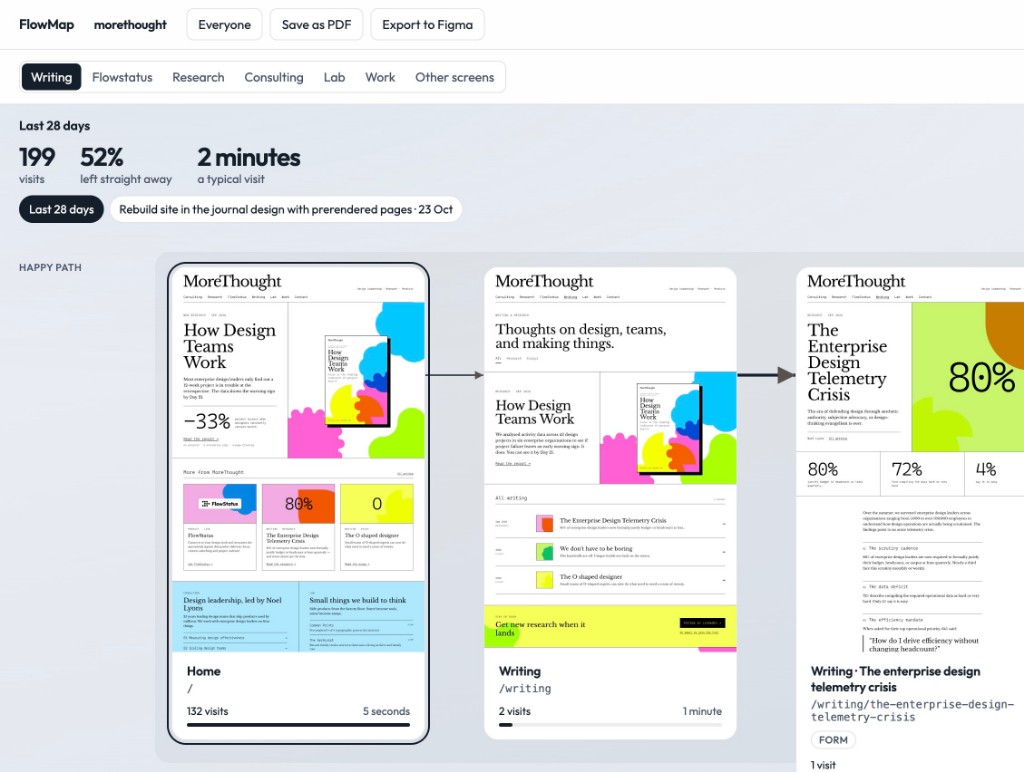
A static flow diagram shows what was built, but it tells you nothing about how it performs. To give the map real context, FlowMap layers two signals directly over the captured journeys:
- Recency and change (Git history): Each journey tracks the latest commit and deployment date. When looking at a complex flow, you instantly see which parts are fresh and which have sat untouched for weeks.
- Actual user behaviour (Google Analytics): Connecting GA4 pulls live session volume, dwell times, and drop-off rates directly onto the corresponding screens in the path.
The result is a unified board: visual interface, underlying path logic, recent changes, and traffic drop-off in a single view. You can see at a glance where a journey leaks users, step back to see the visual layout of that specific page, and understand what changed recently.
Small tools to think with
FlowMap is an open-source experiment rather than a commercial product. It came out of a simple need: when AI lets small teams build and ship at enterprise pace, the operational tools we use to understand what we have created need to keep up.
The full project, including the local runner and Figma export plugin, is available on GitHub: github.com/noellyonsgit/FlowMap.